In the Philippines, online gaming platforms have increasingly become a key choice for users seeking entertainment and leisure. NinoGaming, launched in 2025, holds a license issued by PAGCOR, the official Philippine gaming regulator. The platform integrates multiple game categories, including slots, poker, fishing games, sports betting, and arcade-style games. It offers localized registration, login, and payment experiences via mobile phone numbers and e-wallets.
For users seeking online entertainment platforms, choosing the right one typically depends not only on game content but also involves payment methods, account systems, accessibility, and additional features. This article provides an objective overview of NinoGaming’s key features, registration and login process, payment options, and mobile app, while also offering alternative platform options to ensure users have comprehensive reference information before making a decision.
What is NinoGaming?
NinoGaming Casino is a brand-new online entertainment platform for Filipino players, officially launched in 2025 and licensed by PAGCOR (Philippine Amusement and Gaming Corporation), ensuring secure and compliant operations. The platform primarily partners with multiple renowned game providers to offer Filipino players entertainment content including slots, poker, fishing, sports, and arcade games.
NinoGaming operates under the HawkGaming brand umbrella. Both brands are managed and operated by GEMINI GAMING MANAGEMENT CORPORATION (GGMC), ensuring platform stability and fund security.
NinoGaming Login and Register via Verification Code
NinoGaming uses a phone number + verification code method as its primary registration and login process. Whether you already have an account or not, you can complete registration or login through this process.
- Visit the NinoGaming official website.
- Click the “Register/Login” button in the top-right corner of the homepage.
- Enter your Philippine phone number on the registration page.
- Obtain the verification code and complete the verification on the verification page.
- Click the “Register/Login”, and the system will automatically complete the registration or login process.
Note: For first-time registered users, the system will automatically log them in after registration is complete and prompt them to set a login password.
NinoGaming Login via Password
If you have already registered a NinoGaming account and set a login password, simply enter your mobile number and account password on the login page, then click “Login” to use the password for quick access.
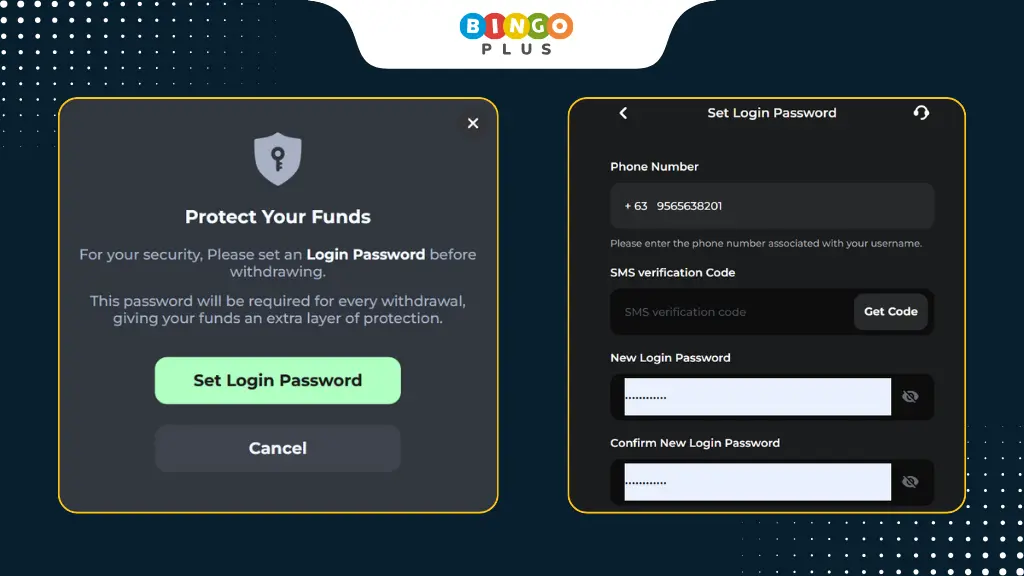
If you haven’t set a password yet, follow these steps to complete the setup:
How to set NinoGaming Login Password
- Click “Set Login Password” in the prompt window, or navigate to My Account > Security Center > Login Password.
- Enter your mobile number and obtain the verification code to complete account verification.
- Set your login password and confirm it again.
- Click the Submit button to complete the login password setup.
How to Deposit via GCash/Maya
Currently, NinoGaming primarily supports popular local e-wallet payment methods in the Philippines, including GCash, Maya, and QRPh. Bank transfers are not supported at this time.
Deposit Procedure:
- On the homepage, click the “Deposit” button.
- Select GCash or Maya as your payment method.
- Set the amount you wish to deposit and click the confirmation button.
- Follow the on-screen prompts to complete the GCash/Maya payment process.
Generally, after payment is completed, the amount will appear in your account balance shortly. The exact time it takes to reflect may vary depending on the payment channel or network conditions.
How to Download NinoGaming App
NinoGaming offers a standalone mobile application compatible with Android and iOS devices. Through the app, users can access the same core features on their phones as they would on the web version.
For security reasons, it is recommended to download the application only through the official NinoGaming website.
For Android Users
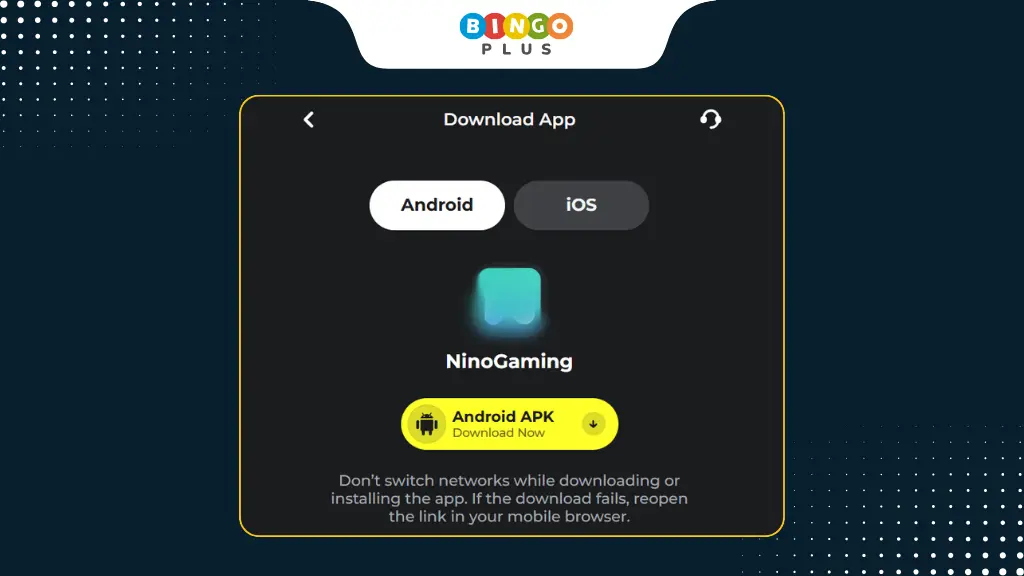
The Android version has not yet been released on the Google Play Store. NinoGaming can only provide it to players as an APK file. Follow these steps:
- Access the NinoGaming official website using your mobile browser.
- Click the menu button in the lower-left corner to navigate to the download page.
- Select the Android APK and click Download Now.
- After the download completes, click the APK file to install it.
- After installation, open the app on your desktop and log in to NinoGaming.
Additional Notes:
If the system prompts that installing apps from unknown sources is prohibited, you can go to your phone’s Settings > Security section to allow installation of apps from unknown sources.
For iOS Users
For players using Apple devices, NinoGaming provides an official App Store download link for quick installation. Follow these steps:
- Go directly to the app page via the download page or open the app store.
- Search for NinoGaming and find the official app.
- Click the Get button on the right and wait for the system to automatically install the app.
- After installation is complete, click the Start button to log in and experience NinoGaming online games.
Tip: Avoid downloading from third-party websites, and never share verification codes or account credentials with others.
Advantages and Limitations of NinoGaming
Possible Advantages
- Legitimate and regulated.
- Supports major local e-wallets.
- Easy registration with just a phone number.
- Accessible via web browser or mobile app.
- Offers a variety of core game types.
Potential Limitations
- No bank or other payment methods available
- The overall ecosystem and long-term content depth are still developing
- Game provider coverage may be somewhat limited
These points may not necessarily be drawbacks for every user, but they could influence users with different needs or preferences to switch to other platforms.
Looking for Alternatives to NinoGaming?
Precisely because NinoGaming’s limitations are as evident as its strengths, many users have begun considering alternative platforms like BingoPlus as a replacement. This stems from their desire for more payment options—such as bank transfers, offline stores, and top-up machines—along with broader game selections or reward systems.
NinoGaming vs BingoPlus
| Feature | NinoGaming | BingoPlus |
|---|---|---|
| Target Market | Philippines | Philippines |
| License | PAGCOR | PAGCOR |
| Established | 2025 | 2022 |
| Payment Methods | GCash, Maya, QRPh | GCash + Bank + Other Options |
| Game Coverage | Standard Categories | Comprehensive coverage + Exclusive |
| App Support | Yes | Yes |
| Account System | Mobile-based | Mobile + More Options |
Note: This comparison is for reference only. Actual experience depends on individual preferences and the platform’s current policies.
Frequently Asked Questions
Yes. Payment and account systems are designed for the Philippine market.
GCash, Maya, and QRPh.
Yes, for both Android and iOS.
Summary
NinoGaming Casino is a quintessential localized entertainment platform in the Philippine market, specializing in mobile access and local e-wallet payments. Whether it’s the right choice largely depends on what users value most: simplicity and localization, or flexibility and richer features.
For users who want to compare different options before making a decision, exploring alternative platforms like BingPlus can provide additional perspectives.